Features | Highlights | Tutorials
This site is specifically built for studying original languages of the bible, i.e. Hebrew and Greek.
High quality biblical data are selected and formatted for public access.
They are organised here into three main categories, as you may find them in the navigation panel, placed at the top:

Hebrew Old Testament
Greek Old Testament

Greek New Testament
Resources are customised into different visual layouts (e.g. plain layout, linguistic annotations, interlinear, parallel reading, etc), to suit a wide range of needs.
You can find lots of handy tools made available with "Tool Panel". This "Tool Panel" is one of major highlights of BibleBento.com. This helps you to link bible verses to relevant and helpful resources.
With this "Tool Panel", you may:
- switch between bible modules
- go to a specific bible verse
- generate a single url for a particular verse
- compare a verse of different bible versions
- get access to cross-references
- get access to topical references
- get access to "Exhaustive Library of Bible Locations"
- get access to resources on bible characters
- get access to a total of 20 bible dictionaries and encyclopedia
- get access to a total of 32 commentaries / commentary series
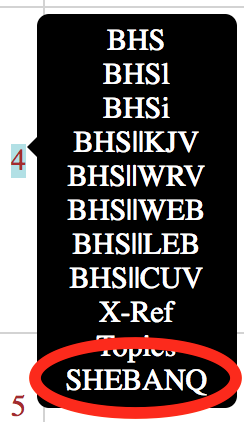
- go to SHEBANQ website for a particular OT verse
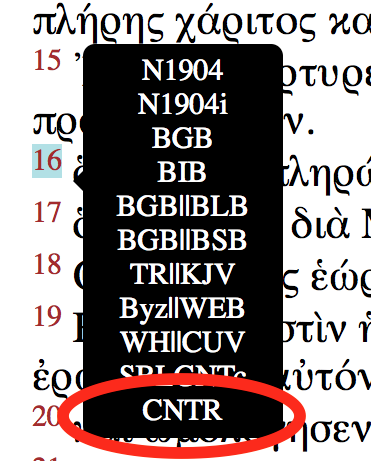
- go to CNTR website for a particular NT verse
- modify settings for parallel reading
- modify BHS layouts in parallel modules
Instructions:
Most bible modules available here are tagged with lexical information, like lexeme, English gloss, and dictionary link, etc.
They are easily accessible either with a mouse-hover or a finger-tap (or a long-tap in case of some Windows-touch devices) over biblical texts:
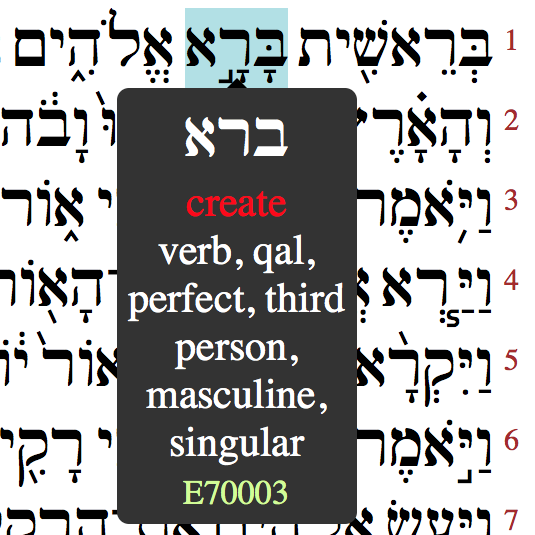 Hovering:
Tapping:
A wide range of browsers is supported, e.g. Chrome, Safari, Firefox, Opera, and Internet Explorer, etc. To enhance your reading experience, you may update your browser to the latest version.
All Hebrew and Greek bibles are tagged with morphological data, which are accessible with a mouse-hover or finger-tap.
A special feature on filtering morphology is available for Hebrew modules.
High-quality linguistic annotations on both Hebrew and Greek bibles are made freely available:
You may look up original Hebrew or Greek words in lexicons:
Currently, two unique sets of concordance & data analysis are made available in BibleBento.com.
"BHSC" is built specifically for Old Testament Studies, based on ETCBC database. In all BHS modules, links to "BHSC" are accessible with hovering or touching on every single Hebrew word.
"Berean" is built specifically for New Testament Studies, based on Berean database. In selected Greek modules (BGB, BIB, BGB||BLB & BGB||BSB), links to "Berean" are accessible with hovering or touching on every single Greek word or translated English word.
Fourteen Bible Dictionaries are grouped together and indexed according to biblical references. They are:
American Tract Society Dictionary
Bridgeway Bible Dictionary
Freeman's Handbook of Bible Manners and Customs
Buck's A Theological Dictionary
Companion Bible Appendices
Dictionary Of Religion And Ethics
Easton's Illustrated Bible Dictionary
Fausset's Bible Dictionary
Bullinger's Figures of Speech
Morrish's Concise Bible Dictionary
Poor Man's Dictionary
Smith's Bible Dictionary
Annals of the World
Vine's Expository Dictionary of New Testament Words
After selecting a particular verse in "Tool Panel", a simply click / touch on "Dictionaries" automatically filters a list of dictionary topics only related to that particular verse. That is, with just a single click / touch, you can search for a bible verse in all fourteen dictionaries listed above. Further clicking / touching on those listed topics gives you full access to individual dictionary articles.
Six "big" Bible Dictionaries / Encyclopedia are grouped together and indexed according to biblical references. They are:
Hasting's Dictionary of the Apostolic Church
Hasting's Dictionary Of Christ And The Gospels
Hasting's Dictionary of the Bible
International Standard Bible Encyclopedia
Kitto's Cyclopedia of Biblical Literature
McClintock & Strong's Cyclopedia of Biblical Literature
After selecting a particular verse in "Tool Panel", a simply click / touch on "Dictionaries" automatically filters a list of dictionary topics only related to that particular verse. That is, with just a single click / touch, you can search for a bible verse in all six "big" dictionaries / encyclopedia listed above. Further clicking / touching on those listed topics gives you full access to individual dictionary articles.
Parallel mode is now available both in "portrait" and "landscape" orientations. You can run parallel resources with a selected bible in parallel.
Instructions:
Some Hebrew and Greek bibles are built with parallel translations and "mutual higlighting".
Users may toggle to show / hide one of the texts at any time, by clicking the abbreviations in table's header. For example, in BHS || KJV, click KJV (located at table headers of each chapter) to hide the text of BHS, another click on KJV brings back the text of BHS.
In Hebrew parallel modules, there are three plus signs, i.e. "+++", appear right next to "BHS" in table headers.
They are all toggle buttons as described below:
Users may highlight all words based on the same Hebrew / Greek lexemes instantly, with a mouse-hover (or a finger-tap in case of touchscreen).
In parallel reading, hovering on words in one of the texts highlights corresponding words in the parallel view.
Enhanced version of the Treasury of Scripture Knowledge is fully integrated in all bible modules, with links for any verses.
TSKe The Treasury of Scripture Knowledge, Enhanced
Copyright 2010, Timothy S. Morton (www.BibleAnalyzer.com). All Rights Reserved. [used with permission]
The original Treasury of Scripture Knowledge is in the public domain. This greatly enhanced and expanded edition is protected by a derivative copyright to ensure its free and open distribution.
Instructions:
1147 Interactive google maps and 1149 digital maps are now fully integrated into EW Bible Reader. Every single verse of Old and New Testaments has a link to X-Ref window, where you may find linked bibles places in KJV verses. Simple click on those links to open bible maps, dictionary articles, and data on occurrences in KJV.
Exhaustive Library of Bible Locations, 2015
Copyright 2015, Timothy S. Morton (www.BibleAnalyzer.com). All Rights Reserved. [used with permission]
Exhaustive Library of Bible Locations, 2015 is an unique and helpful resource available for purchase at Bible Analyzer's online store. Special thanks be to Timothy S. Morton, who generously grant permission to this site on publishing this great set of materials.

Five wonderful resources are now available in this site:
In these five resources, scripture references are grouped into a total of 10484 topics. They are especially helpful for topical studies, research on a specific topic, preparing sermons and bible classes, etc.
You may find them easily accessible with one of the following ways:
Tips: In case you access topical indexes by selecting "Topics" after hovering / touching a verse number, scripture reference of the verse being selected is automatically captured in the search box. Manual editing the reference in the search box gives different result. Emptying the search box gives you the whole list of resources and topics for the whole chapter you are studying.
A total of thirty-two commentaries / commentary series is made available access through "Tool Panel". They are grouped into three categories and indexed according to biblical references:
[Group I - Hebrew & Greek]
Cambridge Greek Testament for Schools and Colleges (1891-1925)
Commentary on the Old Testament (Keil & Delitzsch)
Critical And Exegetical Commentary on the NT (Meyer)
Expositor's Greek New Testament (Nicoll)
Greek Testament Commentary (Alford)
International Critical Commentary, NT (1896-1929)
Word Pictures in the New Testament (Robertson)
Word Studies in the New Testament (Vincent)
[Group II - Exposition]
Notes on the Old and New Testaments (Barnes) [26 Vol.]
Calvin's Commentaries (John Calvin)
Cambridge Bible for Schools and Colleges [57 Vol.]
Companion Bible Notes (Bullinger)
Commentary on the Bible (Clarke)
Expositor's Bible Commentary (Nicoll)
Exposition of the Entire Bible (Gill) [9 Vol.]
An Exposition of the Old and New Testaments (Henry)
Jamieson, Fausset, and Brown Commentary, Unabridged [6 Vol.]
Commentary On The Holy Scriptures (Lange) [24 Vol.]
Expositions of Holy Scripture (MacLaren)
Poor Man's Commentary (Hawker)
Spurgeon’s Expositions on the Bible [3 Vol.]
Treasury of David - Psalms & Matthew, (Spurgeon)
John Wesley's Notes on the Whole Bible
Commentary on the Old and New Testaments (Whedon)
[Group III - Preaching]
Biblical Illustrator
Church Pulpit Commentary (Nisbet)
Expositor's Dictionary Of Texts (Nicoll)
Great Texts Of The Bible (Hastings)
Horæ Homileticæ (Simeon)
Preacher's Homiletic Commentary (Exell)
Pulpit Commentary (Exell)
Sermon Outline Bible (Nicoll)
Usage:
First, select a verse in "Tool Panel" / click or touch on a verse number.
Second, click / touch on either "Hebrew & Greek", "Exposition", or "Preaching".
You can compare different bible versions of a verse.
[Notes - Five versions are set for comparison by default, "Original (Hebrew + Greek)", "KJV", "NET", "LEB", "CUV(和合本)". You can always change after loading by clicking "CHANGE" buttons. Advanced users may even edit the url to set, add or remove versions for first loading.]
Instructions:
In addition to internal links, external links are setup for every single verse, linked to the following third-party websites:
Instructions:
Every single verse in all Hebrew bibles links externally to SHEBANQ website for "ANnotations for Queries and Markup" on the same verse.
SHEBANQ stands for "System for HEBrew Text: ANnotations for Queries and Markup". Scholarly editions of the Bible usually dedicate space to a critical apparatus and various kinds of annotations. SHEBANQ team introduces the idea of annotating the text with queries. They show up next to the chapters where the results are.
Each verse of Greek New Testament links externally to the work of Center for New Testament Restoration (CNTR),
for visual comparison of NT textual variants.
Copyright © 2017 by Alan Bunning [used with permission]
Users may access those links easily.
The are made available in the switch panel, which appears upon a mouse-hover or finger-tap on every single New-Testament verse number.
Simply choose "CNTR" in the switch panel to open a new page on textual comparison for a particular verse.
Advanced users or web developers may access content of a particular module / chapter / verse / dictionary-entry directly, with a single URL.
http://eliranwong.com/index.html + ? + [module]
e.g. http://eliranwong.com/index.html?bgb_blb
http://eliranwong.com/index.html + ? + [module] + & + [book] + . + [chapter]
e.g. http://eliranwong.com/index.html?bhs_kjv&230.23
http://eliranwong.com/index.html + ? + [module] + & + [book] + . + [chapter] + . + [verse]
e.g. http://eliranwong.com/index.html?bhsl&50.6.4
http://eliranwong.com/dictionary.html + ? + [entry of dictionaries]
e.g. http://eliranwong.com/dictionary.html?G3056
You may generate and copy a valid URL for a specific verse with "Tool Panel".
To specify a bible book in URL, you may either use:
'Genesis', 'Exodus', 'Leviticus', 'Numbers', 'Deuteronomy', 'Joshua', 'Judges', 'Ruth', '1_Samuel', '2_Samuel', '1_Kings', '2_Kings', '1_Chronicles', '2_Chronicles', 'Ezra', 'Nehemiah', 'Esther', 'Job', 'Psalm', 'Proverbs', 'Ecclesiastes', 'Song_of_Songs', 'Isaiah', 'Jeremiah', 'Lamentations', 'Ezekiel', 'Daniel', 'Hosea', 'Joel', 'Amos', 'Obadiah', 'Jonah', 'Micah', 'Nahum', 'Habakkuk', 'Zephaniah', 'Haggai', 'Zechariah', 'Malachi', 'Matthew', 'Mark', 'Luke', 'John', 'Acts', 'Romans', '1_Corinthians', '2_Corinthians', 'Galatians', 'Ephesians', 'Philippians', 'Colossians', '1_Thessalonians', '2_Thessalonians', '1_Timothy', '2_Timothy', 'Titus', 'Philemon', 'Hebrews', 'James', '1_Peter', '2_Peter', '1_John', '2_John', '3_John', 'Jude', 'Revelation'
OR
'Gen', 'Exo', 'Lev', 'Num', 'Deu', 'Jos', 'Jdg', 'Rth', '1Sa', '2Sa', '1Ki', '2Ki', '1Ch', '2Ch', 'Ezr', 'Neh', 'Est', 'Job', 'Psa', 'Pro', 'Ecc', 'Son', 'Isa', 'Jer', 'Lam', 'Eze', 'Dan', 'Hos', 'Joe', 'Amo', 'Oba', 'Jon', 'Mic', 'Nah', 'Hab', 'Zep', 'Hag', 'Zec', 'Mal', 'Mat', 'Mar', 'Luk', 'Joh', 'Act', 'Rom', '1Co', '2Co', 'Gal', 'Eph', 'Phi', 'Col', '1Th', '2Th', '1Ti', '2Ti', 'Tit', 'Phm', 'Heb', 'Jas', '1Pe', '2Pe', '1Jn', '2Jn', '3Jn', 'Jud', 'Rev'
OR
'10', '20', '30', '40', '50', '60', '70', '80', '90', '100', '110', '120', '130', '140', '150', '160', '190', '220', '230', '240', '250', '260', '290', '300', '310', '330', '340', '350', '360', '370', '380', '390', '400', '410', '420', '430', '440', '450', '460', '470', '480', '490', '500', '510', '520', '530', '540', '550', '560', '570', '580', '590', '600', '610', '620', '630', '640', '650', '660', '670', '680', '690', '700', '710', '720', '730'
For examples:
https://biblebento.com/index.html?kjv&Deuteronomy.6.4
https://biblebento.com/index.html?kjv&Deu.6.4
https://biblebento.com/index.html?kjv&50.6.4
To maximize the use of screen, especially in small-screen devices, you can now turn on fullscreen mode via button "Screen", located under "sliders" icon at left upper corner of navigation menu.
BibleBento.com now supports standalone web app in both Android and iOS devices. More details later...